Create your own iPhone ringtone - iPhone Ringtone Maker
iPhone Ringtone Maker is specially designed for iPhone users to make their unique iPhone Ringtone from their favourite audio and video files. This iPhone Ringtone Maker can convert WAV to M4R, convert MP3 to M4R, and convert all other popular audio formats to iPhone supported Ringtone format M4R with high conversion speed and sound conversion quality.
Apart from its powerful converting capacity, iPhone Ringtone Maker can also help you edit your added iPhone Ringtone by removing it and renaming it directly. In addition, iPhone Ringtone Maker can export the output M4R files to your iPhone directly without using iTunes.
How to Create Your Own iPhone Ringtone
At the very beginning, you should download iPhone Ringtone Maker program and install it.
Step 1: Double-click the program icon to launch it. A user-friendly interface will pop up.
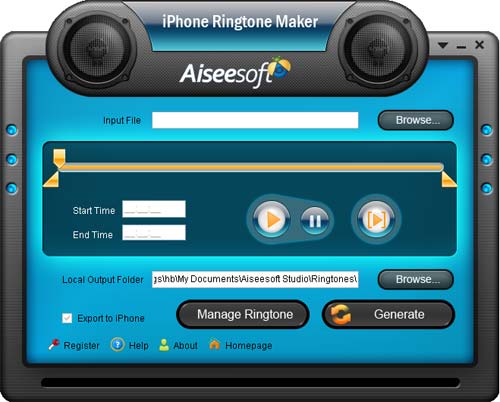
Step 2: Click  button on the right side of Input File to add the selected WAV file into the program interface.
Step 3: Click  button to listen the selected music. You can convert the whole WAV file or just convert your favourite clips into your iPhone Ringtone M4R.
Tips:
1. Drag and click the start & end slider to set your wanted segment
2. Type the start & end time in the corresponding text box directly to get the exact segment.
Step 4: Click  button to pre-listen the converted music before generating if you like.
Step 5: Click on the right side of Local Output Folder to choose the output destination.
Step 6: Check  option, the converted ringtone will be loaded to your iPhone directly.
Step 7: After above-mentioned steps, click  to start making your own iPhone Ringtone.
Tips:You can edit the added iPhone Ringtone by click  , it's easy for you to rename the iPhone Ringtone or remove it from your iPhone directly.